Keep your Medicaid patients covered when work requirements start.
A Spanish-first text assistant checks each patient for exemptions, reads their proof from a photo, and faxes it to the state with confirmation. Your staff only see the patients who need a person.
3 minutes in your browser. No sign-up, no app, fictional patients.
- Works by regular text message
- Spanish and English
- No IT integration
- Staff approve before anything goes to the state
A monthly paperwork rule, with a 30-day clock.
Adults 19 to 64 in Medicaid expansion will have to show, every month, that they work, study, volunteer, or qualify for an exemption. Patients who miss the paperwork lose coverage, even when they qualify.
The latest start date. States can start earlier.
CMS fact sheetEach month: work, community service, or a work program. Or half-time school, or about $580 in income.
CMS fact sheetTo respond after a state notice, or coverage can end.
CMS fact sheetMore people projected to lose coverage from paperwork barriers alone.
Holland & Knight summary of the CMS ruleFrom "new rule" to "documents at the state," by text message.
Patients don't download anything. They reply to a text from your clinic, in Spanish or English, in about two minutes.
The clinic texts first
Each patient gets a friendly text from your clinic, then a check-in every month.
Exemptions first
Five yes/no questions: pregnancy, caregiving, health, treatment, SNAP/TANF. A "yes" gets a clear list of what to send.
Proof from a photo
The patient photographs a pay stub or school letter. The hours and pay are read automatically, and the 80-hour math is done for them.
Faxed, with proof
Staff approve, the documents are faxed to the state, and the patient gets the confirmation number by text.
One list. Most urgent first.
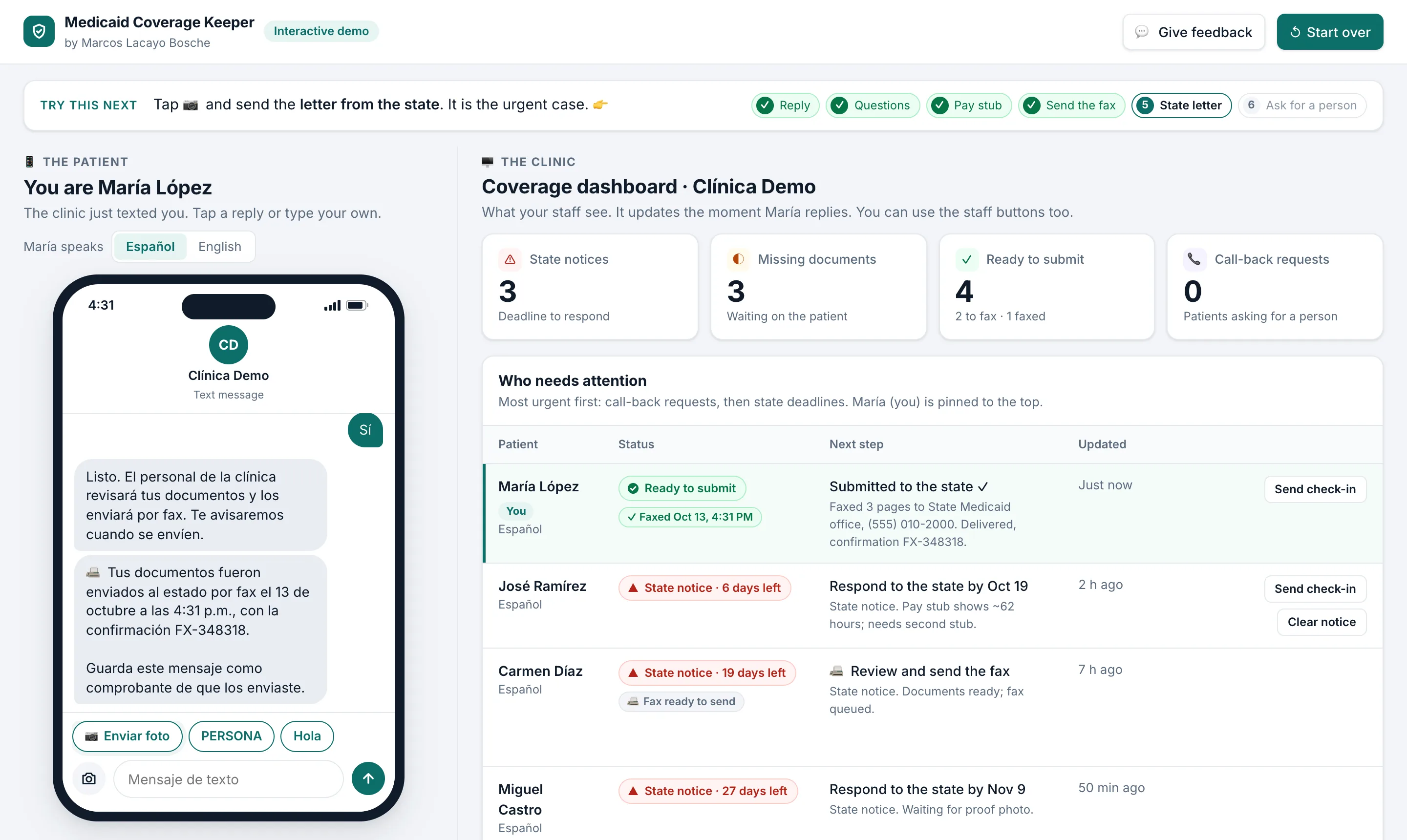
The dashboard answers one question: who needs a person today? Everyone else is handled by text.
- State deadlines on topA photo of the state letter puts the patient at the top with the days left.
- Call-backs when patients askTexting PERSONA flags the patient for a call. The bot never pretends to be a person.
- Review, then fax in one clickSee the cover sheet and documents, send, and keep the delivery confirmation.
See it for yourself in 3 minutes.
You play María, a patient, on a phone on the left. The clinic dashboard on the right updates as you reply. Nothing to install, and every patient is fictional.
Open the interactive demo →- 1Answer the clinic's text and the exemption questions
- 2Send a photo of a pay stub and watch María turn green
- 3Review and fax the documents as staff
- 4Send a state letter, then ask for a person
The state decides. Your staff stay in control.
Never decides eligibility
The assistant never tells a patient they are "compliant" or "exempt." It says documents are ready, or that they may qualify.
Human review before submission
Nothing goes to the state until a staff member reviews it. The math is plain code your team can check, not a guess.
Privacy first
The demo uses fictional patients. Before any real patient data, every vendor signs a business associate agreement with you.
Start with 90 days.
Everything between "new rule" and "documents submitted," set up for your state's notices and submission options.
Set up for your state's notices, your patient volume, and your team. We'll scope it together on a short call.
- Bilingual text assistant, Spanish first
- Exemption screening and document collection
- Monthly check-ins with every enrolled patient
- State-notice support with deadline tracking
- Document submission by fax, with patient sign-off and delivery confirmation
- Spanish-speaking follow-up for missing documents
- Weekly at-risk report for your team
Your staff work the patients with a state deadline or a call-back request, and review documents before they're faxed. Green and most of yellow are handled by text.
- No new app for patients
- No IT integration to start
- Setup matched to your state's notices
- Your clinic's name on every message
Frequently asked questions
Does it decide who is eligible or exempt?
No. The state decides. The assistant collects documents and tells patients when their documents are ready to submit, or that they may qualify for an exemption. Your staff review before anything is sent.
Do patients need an app or WhatsApp?
No. It works by regular text message on any phone, including photos. Patients reply to a text from your clinic's number.
What if a patient wants to talk to a person?
They text PERSONA (or PERSON) at any time. They're flagged on your dashboard for a call back, and the bot tells them someone will call.
Which states does it work in?
The rule applies to adults in Medicaid expansion, so the pilot is for health centers in expansion states. During setup we match the checklist to your state's notices and submission options (portal, fax, or in person).
How is patient data handled?
The demo uses fictional patients only. Before any real patient data is involved, we work through your organization's privacy and security requirements with your compliance team, including business associate agreements with every vendor that touches patient data.
What does our staff do?
Work the red list: patients with a state deadline or a call-back request. Review documents and send the fax. Everyone in green and most of yellow is handled by text.
Book a 30-minute call.
Tell us who you are, then pick a time on the calendar. We'll walk through the assistant and the dashboard, and talk about your patient volume and your state.
Haven't tried it yet? Open the interactive demo. It takes 3 minutes.